
Education Library
Change Lead Status
- Click the call button or lead ID hyperlinked next to the lead name
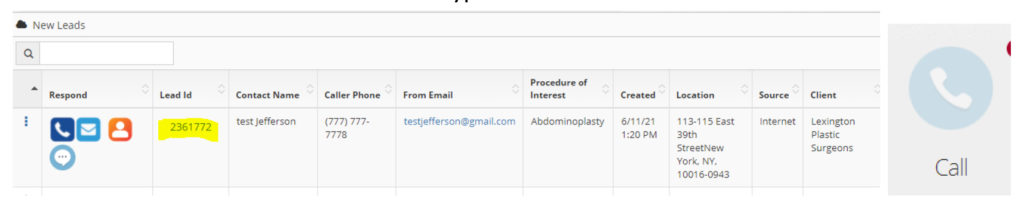
- Select ‘Change Lead Status.’
- Click appropriate lead status. Add notes and hit submit to save
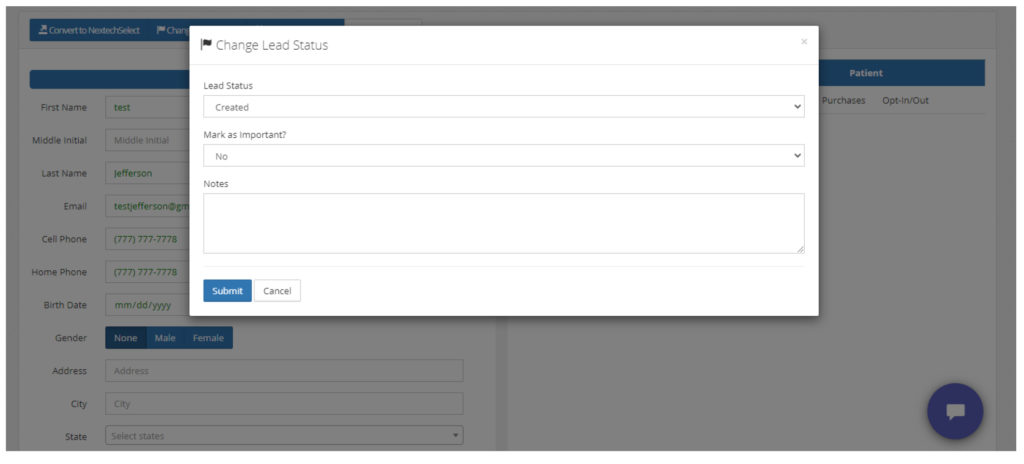
- Created – every new lead in Portal that hasn’t been contacted automatically is marked as created
- Contacted – used when contact is made with the lead but a follow-up is needed to finalize the appointment
- Scheduled – used when the phone call results in a scheduled appointment. This state triggers appointment reminders from automatically being sent
- Office transfer – used by RSI’s lead management team to notate they transferred the call to the office. This feature is NOT used by clients at this time
- Invalid – used when the lead is not a valid lead that can be scheduled such as job seekers, SEO company, or incorrect number
- Dead Lead – used for new patients that were unable to be scheduled for any reason including no longer interested or price shopping