

Education Library
Assigning Unique Phone Numbers Per Campaign
The Foundation of Call Tracking
Accurate call attribution requires one unique phone number per marketing campaign. This is the most critical step in setting up call tracking—without unique numbers, you cannot determine which campaigns are driving phone leads.Why Unique Numbers Are Required
The Attribution Logic
When someone calls a tracking number:- RSI captures which specific number was dialed
- That number is mapped to a specific campaign in your account
- The call is attributed to that campaign in reporting
Real-World Example
Scenario: You’re running three paid media campaigns ❌ Incorrect – Shared Number: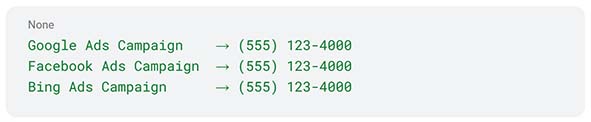 Result: All calls get attributed to one campaign (usually the first one created). Your reporting shows zero calls for Facebook and Bing even though they’re generating calls.
✅ Correct – Unique Numbers:
Result: All calls get attributed to one campaign (usually the first one created). Your reporting shows zero calls for Facebook and Bing even though they’re generating calls.
✅ Correct – Unique Numbers:
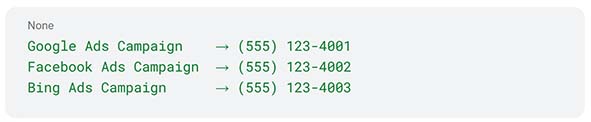 Result: Accurate attribution. You can see exactly how many calls each campaign generates.
Two Scenarios for Assigning Numbers
Scenario 1: Each Campaign Has Its Own Destination
When to use this approach:- Campaigns drive to different landing pages
- Offline marketing (print, radio, TV, billboards)
- Email campaigns with unique landing pages
- Different service lines or locations
- LASIK Campaign (landing page: yoursite.com/lasik) → (555) 123-4001
- Cataract Campaign (landing page: yoursite.com/cataract) → (555) 123-4002
- Dry Eye Campaign (landing page: yoursite.com/dry-eye) → (555) 123-4003
Scenario 2: Multiple Campaigns Drive to the Same Pages
When DNI is required:- Multiple Google Ads campaigns all link to yoursite.com
- Facebook Ads and Google Ads both drive to the homepage
- Different ad groups within the same campaign need separate tracking
- You want keyword-level call attribution
How to Assign Numbers in Your RSI Account
Step 1: Inventory Your Campaigns
Create a list of all active marketing campaigns:- Campaign name
- Traffic source (Google Ads, Facebook, Bing, etc.)
- Destination URL
- Whether multiple campaigns share the same destination
Step 2: Determine Number Requirements
For campaigns with unique destinations:- 1 number per campaign
- 1 call pool per traffic source (pool size depends on traffic volume)
- Work with your Customer Success Manager to determine appropriate pool sizes
Step 3: Request and Assign Numbers
Work with your RSI Customer Success Manager to:- Provision the required tracking numbers
- Configure numbers in your VoIP system
- Map each number to its campaign in RSI tracking
- Set up DNI if needed
Step 4: Implement Numbers
For static numbers:- Update your website with the new tracking numbers
- Replace numbers in offline marketing materials
- Update ad extensions in Google Ads, Bing Ads, etc.
- RSI will implement the DNI script on your website
- Numbers will automatically display based on traffic source
Step 5: Test and Verify
Before launching campaigns:- Visit your website from each traffic source
- Verify the correct tracking number displays
- Place test calls to ensure routing works properly
- Confirm calls appear in RSI reporting with correct attribution
Planning Your Number Needs
Questions to Consider
- How many distinct campaigns are you running?
- Each needs at least one unique number or call pool
- Are you tracking at the campaign or ad group level?
- Ad group tracking requires more numbers/larger pools
- Do you have offline marketing?
- Each offline channel needs dedicated numbers
- What’s your website traffic volume?
- Higher traffic to shared pages = larger DNI pools needed
- Are you tracking multiple locations?
- Consider location-specific numbers for better local presence
Example Number Plan
Small Practice – 5 Total Numbers:- Google Ads → 1 number (single landing page)
- Facebook Ads → 1 number (single landing page)
- Organic/Direct → 1 number (website homepage)
- Print Ad → 1 number (offline tracking)
- Referral Program → 1 number (tracking partner referrals)
- Google Ads Campaign 1 → Pool of 10 numbers (DNI on shared pages)
- Google Ads Campaign 2 → Pool of 5 numbers (DNI on shared pages)
- Facebook Ads → Pool of 5 numbers (DNI on shared pages)
- Organic/Direct → 1 number
- Offline Marketing → 4 separate numbers (print, radio, billboard, direct mail)
Common Mistakes to Avoid
❌ Mistake 1: Reusing Numbers Across Campaigns
Problem: “We have 5 campaigns but only 2 tracking numbers” Solution: Each campaign must have its own unique number or be part of a separate DNI pool❌ Mistake 2: Not Accounting for Shared Destinations
Problem: “We assigned unique numbers but they all go to the homepage” Solution: Use DNI when multiple campaigns share landing pages❌ Mistake 3: DNI Pool Too Small
Problem: “We have 3 numbers in our pool but 50 concurrent website visitors” Solution: Work with your CSM to appropriately size pools (typically 1 number per 5-10 concurrent visitors)❌ Mistake 4: Forgetting Organic Traffic
Problem: “We only track paid campaigns, organic visitors see our old main number” Solution: Assign a tracking number to organic traffic to capture all phone leads❌ Mistake 5: Not Testing Before Launch
Problem: “Calls aren’t being attributed correctly” Solution: Always test by visiting from each source and placing test calls before spending ad budgetNumber Maintenance Best Practices
Regular Audits
- Monthly: Review campaigns and ensure numbers are still correctly mapped
- Quarterly: Verify all active campaigns have unique tracking
- When launching new campaigns: Immediately assign and test new numbers
When Campaigns End
- Keep the tracking number assigned for at least 30 days after campaign ends (people may call from saved information)
- Document the number for historical reporting
- Numbers can be reassigned to new campaigns after a waiting period
Updating Numbers
If you need to change a tracking number:- Update the number in RSI system first
- Update website/marketing materials
- Test the new number
- Keep the old number active for 1-2 weeks during transition
Getting Help
Your Customer Success Manager can assist with:- Determining how many numbers/pools you need
- Provisioning new tracking numbers
- Setting up campaign mappings
- Configuring DNI for complex setups
- Troubleshooting attribution issues
- Optimizing your call tracking strategy
Related Resources
- Understanding Call Tracking Overview – Learn call tracking fundamentals
- Using Dynamic Number Insertion (DNI) – Required for multiple campaigns on shared pages
- Google Ads Call Tracking Explained – Understanding Google’s call reporting vs. RSI tracking














