Watch a Demo
Step 1
Login to
portal.redspotinteractive.com
Step 2
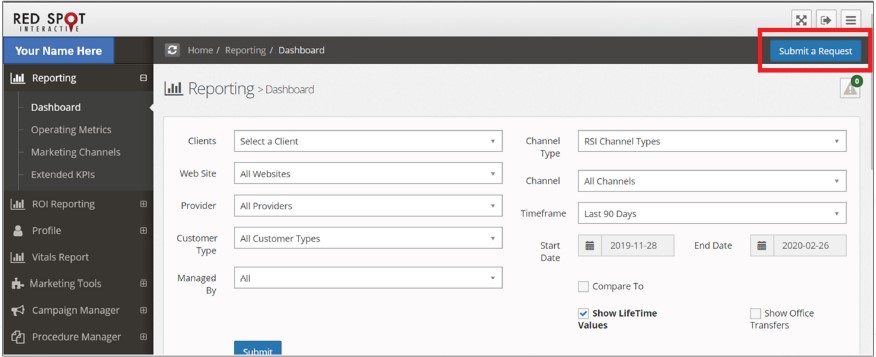
Click on the “Submit a Request” button
 Step 3
Enter all the information requested including the following information. (description of fields below)
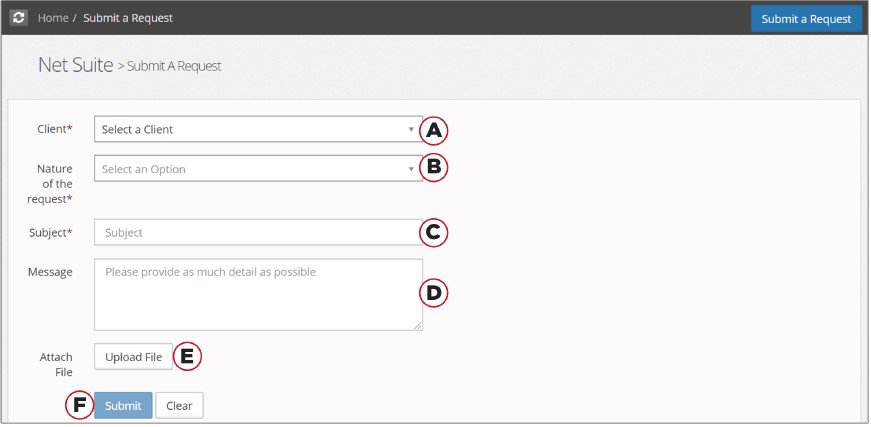
- Nature of the request
- Questions/Customer Success – one-off questions or general consulting help
- Graphic Designs or Content – creative designs for marketing pieces or new procedure pages or blogs for the website
- Phone Tracking – Ordering a new phone number for a marketing campaign or reporting phone routing issues
- Software – IT support for any of our software products
- RSI Patient Scheduling Call Center – lead management/answering services
- SEO/Paid Advertising – Consulting regarding SEO rankings or PPC management
- Website Edits or Request – all website edits including adding new content, specials, before and after photos, etc.
- Training – Requests to schedule 1-on-1 training sessions for software products or website editing
- Subject – brief description of the request
- Message – detailed description/instruction of the request
- Note → the more information provided to the RSI team, the more efficient we will be in completing your request.
- Attach files – click the upload file button, select files from your computer, and submit.
- Submit – You will receive a case number via email confirming that the Customer Success Team has received your request.
To view the status of the ticket or add comments, please visit
https://portal.redspotinteractive.com/NetSuite/SubmitARequest